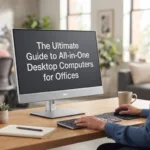
Best All-in-One Desktop PCs for Offices: Benefits, Features & Buying Guide
Discover how all-in-one desktop computers can help modern offices save desk space, simplify setup and provide reliable performance for everyday business tasks.
Modern offices need technology that works efficiently without taking over the workspace. Traditional desktop setups can require a separate tower, monitor, speakers and several cables. All-in-one desktop computers for offices bring the core components together in a single, streamlined system.
For businesses, the decision is about more than processor speed. The right office computer should balance performance, desk space, reliability, employee productivity and long-term value. This guide explains the benefits of business AIO PCs and what to look for before buying computers for your office.
Key Takeaways
- All-in-one PCs combine the display and computer hardware into a single streamlined workstation.
- They can help offices make better use of limited desk space.
- The right configuration depends on workload, software, employee requirements and expected usage.
- Businesses should consider processor performance, RAM, SSD storage, display size, connectivity and upgradeability.
- Buying according to actual business requirements can help avoid unnecessary hardware costs.
What Is an All-in-One Desktop PC?
An all-in-one desktop PC combines the computer's main hardware components with its display in one integrated unit. Instead of having a separate desktop tower and monitor, most of the essential hardware is built behind or within the screen.
This design makes AIO computers particularly attractive for offices where space efficiency, clean workstations and simple deployment are important.
Explore Compeq's collection of All-in-One PCs designed for modern workspaces, business users and everyday productivity.
Compact Workspace
AIO systems reduce the number of separate components needed on or around an employee's desk.
Cleaner Setup
Fewer components can result in a more organised workstation with reduced cable clutter.
Easier Deployment
Businesses can simplify installation because the display and primary computing hardware are integrated.
Benefits of All-in-One Desktop PCs for Offices
Office environments often require computers that are reliable, practical and easy to manage. All-in-one systems can provide several advantages when selected according to the organisation's actual requirements.
1. Better Use of Desk Space
One of the biggest advantages of an AIO PC is its compact design. Since the computer and monitor are integrated, employees can have more usable desk space for documents, accessories and other workplace equipment.
2. Reduced Cable Clutter
Traditional desktop configurations can require multiple cables connecting the computer, monitor, speakers and other accessories. An all-in-one setup can create a cleaner and more organised workstation.
3. Professional Office Appearance
Clean workstations can contribute to a more modern office environment. This can be particularly useful for reception areas, customer-facing teams and corporate workspaces.
4. Easier Installation
Because the primary computing components are integrated into one device, installation can be simpler compared with configuring multiple desktop components separately.
5. Efficient Everyday Performance
Modern AIO computers can handle common business workloads such as web applications, Microsoft Office applications, video meetings, accounting software, CRM systems and business communication tools.
Office Buying Tip
Do not select an AIO computer based only on its appearance. Consider the software employees use every day and choose the processor, memory and storage configuration accordingly.
Performance and Hardware Considerations
Performance requirements vary significantly between businesses. A computer used for email and spreadsheets does not necessarily need the same configuration as a workstation used for demanding applications or professional software.
Processor
The processor has a major impact on overall system responsiveness. For general office work, modern entry-level and mid-range processors can be sufficient. More demanding workloads may benefit from a higher-performance processor.
Graphics
Integrated graphics can be sufficient for many office workloads, including productivity applications, browser-based tools and video conferencing. Users with specialised graphics requirements should consider systems designed for those workloads.
Display
Screen size and resolution can influence employee comfort and productivity. Businesses should consider the applications employees use and the amount of information displayed simultaneously.
RAM and Storage: What Should an Office Choose?
RAM and storage have a direct impact on how efficiently a computer handles everyday applications.
Best Office Use Cases for All-in-One PCs
All-in-one computers can work well across a variety of business environments. The ideal configuration depends on the role and workload of each employee.
Reception & Front Desk
Compact systems can help maintain an organised reception while supporting visitor management, email and administrative applications.
Administration
AIO PCs are suitable for spreadsheets, documents, email, browser applications and everyday administrative tasks.
Customer Service
Customer service teams can use AIO systems for CRM platforms, communication tools and browser-based applications.
Sales Teams
Sales employees can use them for CRM systems, presentations, email, spreadsheets and online meetings.
Accounting
With an appropriate configuration, AIO PCs can support accounting platforms, spreadsheets and financial workflows.
Small Businesses
AIO systems can provide a practical balance between workspace, performance and simplified deployment.
All-in-One PC Buying Guide for Businesses
Before purchasing computers for an office, businesses should compare specifications against their actual requirements rather than choosing a system purely because it has the highest numbers.
| Requirement | What to Consider | Why It Matters |
|---|---|---|
| Processor | Workload and software requirements | Determines overall processing capability |
| RAM | Number of applications used simultaneously | Supports multitasking |
| Storage | SSD capacity and business data needs | Affects responsiveness and available space |
| Display | Size, resolution and viewing requirements | Impacts workspace and usability |
| Connectivity | USB, networking and peripheral requirements | Ensures compatibility with office equipment |
| Warranty | Coverage and business support | Helps reduce operational risk |
Think About Total Cost of Ownership
The cheapest computer is not always the most cost-effective choice. Businesses should consider purchase price, expected lifespan, maintenance, productivity and the potential cost of upgrading or replacing systems later.
Standardise Where Possible
Businesses purchasing multiple computers may benefit from standardising configurations for employees with similar roles. This can simplify deployment, troubleshooting and ongoing IT management.
Buying Tip for Growing Businesses
If you are purchasing computers for multiple employees, create different configurations based on job roles. For example, administrative employees may require a different specification from designers, developers or employees working with demanding business applications.
Frequently Asked Questions
Are all-in-one desktop PCs good for offices?
Yes. All-in-one desktop PCs can be a practical choice for offices because they combine the computer and display into one unit, helping reduce desk clutter while providing suitable performance for many business workloads.
What should I look for in an office AIO PC?
Consider the processor, RAM, SSD storage, display, connectivity, software requirements, warranty and expected workload before purchasing an AIO PC for an office.
Are AIO computers better than traditional desktops?
It depends on the business requirement. AIO PCs offer a cleaner and more compact setup, while traditional desktops may provide greater flexibility for upgrades and custom configurations.
How much RAM does an office computer need?
The appropriate amount depends on the software and number of applications employees use simultaneously. Businesses should select RAM based on their actual workloads rather than using a single specification for every employee.
Is an SSD important for an office computer?
Yes. SSD storage can improve system responsiveness and application loading, making it a useful feature for modern office computers.
Where can I buy All-in-One PCs in the UAE?
Businesses in the UAE can explore Compeq's All-in-One PC collection to compare available systems and choose a model suitable for their office requirements.
Choose the Right All-in-One PC for Your Office
Choosing the right office computer is about matching technology with the way your employees actually work. All-in-one desktop PCs can provide a clean, space-efficient setup while supporting common business applications and everyday productivity.
Before making a purchase, evaluate the processor, RAM, SSD storage, display, connectivity and long-term requirements of your business. A well-planned configuration can help your team work efficiently while avoiding unnecessary hardware expenditure.
Find the Right All-in-One PC for Your Business
Explore Compeq's range of All-in-One PCs and find a practical computer solution for your office, workspace or business team.
Shop All-in-One PCs →